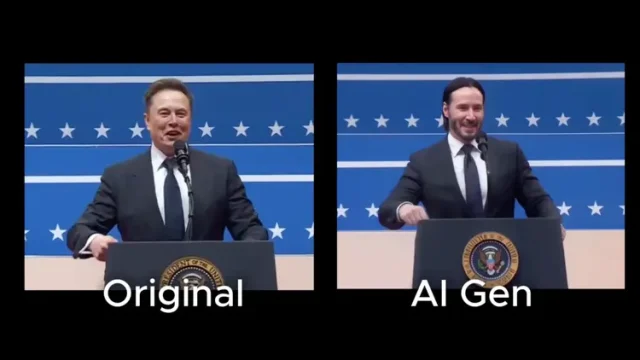
Here’s what you’ll be able to do after following this guide:
💡 Create Seamless Face Actor Deepfakes: Replace actors’ faces or characters with AI-powered precision for film production, ads, or personalized content.
🎥 Transform Video Elements While Keeping It Real: Swap out objects, characters, or entire faces, ensuring smooth transitions, frame-to-frame consistency, and flawless lighting adjustments.
🚀 Unlock Creative Potential with Flow Consistency: Make edits that feel natural and cinematic—no flickering, no mismatched frames.
BONUS – Use Celebrity and Custom AI Models: Blend faces of your favorite celebrities (like Jennifer Lawrence or John Wick) or custom AI-generated ones into your videos with incredible realism.
This guide is perfect for you if you want to:
✨ Experiment with actor face replacements and dynamic video edits
✨ Learn how to seamlessly transform video elements like characters and environments
✨ Harness cutting-edge AI tools to create stunning, professional-looking results
What’s Inside:
✅ Hunyuan V2V + Flow Edit on Workflow
✅ Step-by-Step Guide to Setting Up Hunyuan Flow Edit on ComfyUI
✅ Setting Up ComfyUI on Runpod
✅ Easy Workflow for Face Replacement
✅ Links to Celebrity and Custom Models
✅ Pro Tips for Maintaining Motion, Lighting, and Realism
✅ Example Work